# Pi: The Minimal Agent Within OpenClaw
If you haven't been living under a rock, you will have noticed this week that a
project of my friend Peter [went viral on the
internet](https://en.wikipedia.org/wiki/OpenClaw). It went by many names. The
most recent one is [OpenClaw](https://openclaw.ai/) but in the news you might
have encountered it as ClawdBot or MoltBot depending on when you read about it.
It is an agent connected to a communication channel of your choice that [just
runs code](https://lucumr.pocoo.org/2025/7/3/tools/).
What you might be less familiar with is that what's under the hood of OpenClaw
is a little coding agent called [Pi](https://github.com/badlogic/pi-mono/). And
Pi happens to be, at this point, the coding agent that I use almost exclusively.
Over the last few weeks I became more and more of a shill for the little agent.
After I gave a talk on this recently, I realized that I did not actually write
about Pi on this blog yet, so I feel like I might want to give some context on
why I'm obsessed with it, and how it relates to OpenClaw.
Pi is written by [Mario Zechner](https://mariozechner.at/) and unlike Peter, who
aims for "sci-fi with a touch of madness," [^1] Mario is very grounded. Despite
the differences in approach, both OpenClaw and Pi follow the same idea: LLMs are
really good at writing and running code, so embrace this. In some ways I think
that's not an accident because Peter got me and Mario hooked on this idea, and
agents last year.
## What is Pi?
So Pi is a coding agent. And there are many coding agents. Really, I think you
can pick effectively anyone off the shelf at this point and you will be able to
experience what it's like to do agentic programming. In reviews on this blog
I've positively talked about AMP and one of the reasons I resonated so much with
AMP is that it really felt like it was a product built by people who got both
addicted to agentic programming but also had tried a few different things to see
which ones work and not just to build a fancy UI around it.
Pi is interesting to me because of two main reasons:
* First of all, it has a tiny core. It has the shortest system prompt of any
agent that I'm aware of and it only has four tools: Read, Write, Edit, Bash.
* The second thing is that it makes up for its tiny core by providing an
extension system that also allows extensions to persist state into sessions,
which is incredibly powerful.
And a little bonus: Pi itself is written like excellent software. It doesn't
flicker, it doesn't consume a lot of memory, it doesn't randomly break, it is
very reliable and it is written by someone who takes great care of what goes
into the software.
Pi also is a collection of little components that you can build your own agent
on top. That's how OpenClaw is built, and that's also how I built my own little
Telegram bot and how Mario built his
[mom](https://github.com/badlogic/pi-mono/tree/main/packages/mom). If you want
to build your own agent, connected to something, Pi when pointed to itself and
mom, will conjure one up for you.
## What's Not In Pi
And in order to understand what's in Pi, it's even more important to understand
what's not in Pi, why it's not in Pi and more importantly: why it won't be in
Pi. The most obvious omission is support for MCP. There is no MCP support in
it. While you could build an extension for it, you can also do what OpenClaw
does to support MCP which is to use
[mcporter](https://github.com/steipete/mcporter). mcporter exposes MCP calls via
a CLI interface or TypeScript bindings and maybe your agent can do something
with it. Or not, I don't know :)
And this is not a lazy omission. This is from the philosophy of how Pi works.
Pi's entire idea is that if you want the agent to do something that it doesn't
do yet, you don't go and download an extension or a skill or something like
this. You ask the agent to extend itself. It celebrates the idea of code
writing and running code.
That's not to say that you cannot download extensions. It is very much
supported. But instead of necessarily encouraging you to download someone else's
extension, you can also point your agent to an already existing extension, say
like, build it like the thing you see over there, but make these changes to it
that you like.
## Agents Built for Agents Building Agents
When you look at what Pi and by extension OpenClaw are doing, there is an
example of software that is malleable like clay. And this sets certain
requirements for the underlying architecture of it that are actually in many
ways setting certain constraints on the system that really need to go into the
core design.
So for instance, Pi's underlying AI SDK is written so that a session can really
contain many different messages from many different model providers. It
recognizes that the portability of sessions is somewhat limited between model
providers and so it doesn't lean in too much into any model-provider-specific
feature set that cannot be transferred to another.
The second is that in addition to the model messages it maintains custom
messages in the session files which can be used by extensions to store state or
by the system itself to maintain information that either not at all is sent to
the AI or only parts of it.
Because this system exists and extension state can also be persisted to disk, it
has built-in hot reloading so that the agent can write code, reload, test it and
go in a loop until your extension actually is functional. It also ships with
documentation and examples that the agent itself can use to extend itself. Even
better: sessions in Pi are trees. You can branch and navigate within a session
which opens up all kinds of interesting opportunities such as enabling workflows
for making a side-quest to fix a broken agent tool without wasting context in
the main session. After the tool is fixed, I can rewind the session back to
earlier and Pi summarizes what has happened on the other branch.
This all matters because for instance if you consider how MCP works, on most
model providers, tools for MCP, like any tool for the LLM, need to be loaded
into the system context or the tool section thereof on session start. That
makes it very hard to impossible to fully reload what tools can do without
trashing the complete cache or confusing the AI about how prior invocations work
differently.
## Tools Outside The Context
An extension in Pi can register a tool to be available to the LLM to call and
every once in a while I find this useful. For instance, despite my criticism of
how Beads is implemented, I do think that giving an agent access to a to-do list
is a very useful thing. And I do use an agent-specific issue tracker that works
locally that I had my agent build itself. And because I wanted the agent to also
manage to-dos, in this particular case I decided to give it a tool rather than a
CLI. It felt appropriate for the scope of the problem and it is currently the
only additional tool that I'm loading into my context.
But for the most part all of what I'm adding to my agent are either skills or
TUI extensions to make working with the agent more enjoyable for me. Beyond
slash commands, Pi extensions can render custom TUI components directly in the
terminal: spinners, progress bars, interactive file pickers, data tables,
preview panes. The TUI is flexible enough that Mario proved you can [run Doom
in it](https://x.com/badlogicgames/status/2008702661093454039). Not practical,
but if you can run Doom, you can certainly build a useful dashboard or debugging
interface.
I want to highlight some of my extensions to give you an idea of what's
possible. While you can use them unmodified, the whole idea really is that you
point your agent to one and remix it to your heart's content.
### [`/answer`](https://github.com/mitsuhiko/agent-stuff/blob/main/pi-extensions/answer.ts)
I [don't use plan mode](/2025/12/17/what-is-plan-mode/). I encourage the agent
to ask questions and there's a productive back and forth. But I don't like
structured question dialogs that happen if you give the agent a question tool.
I prefer the agent's natural prose with explanations and diagrams interspersed.
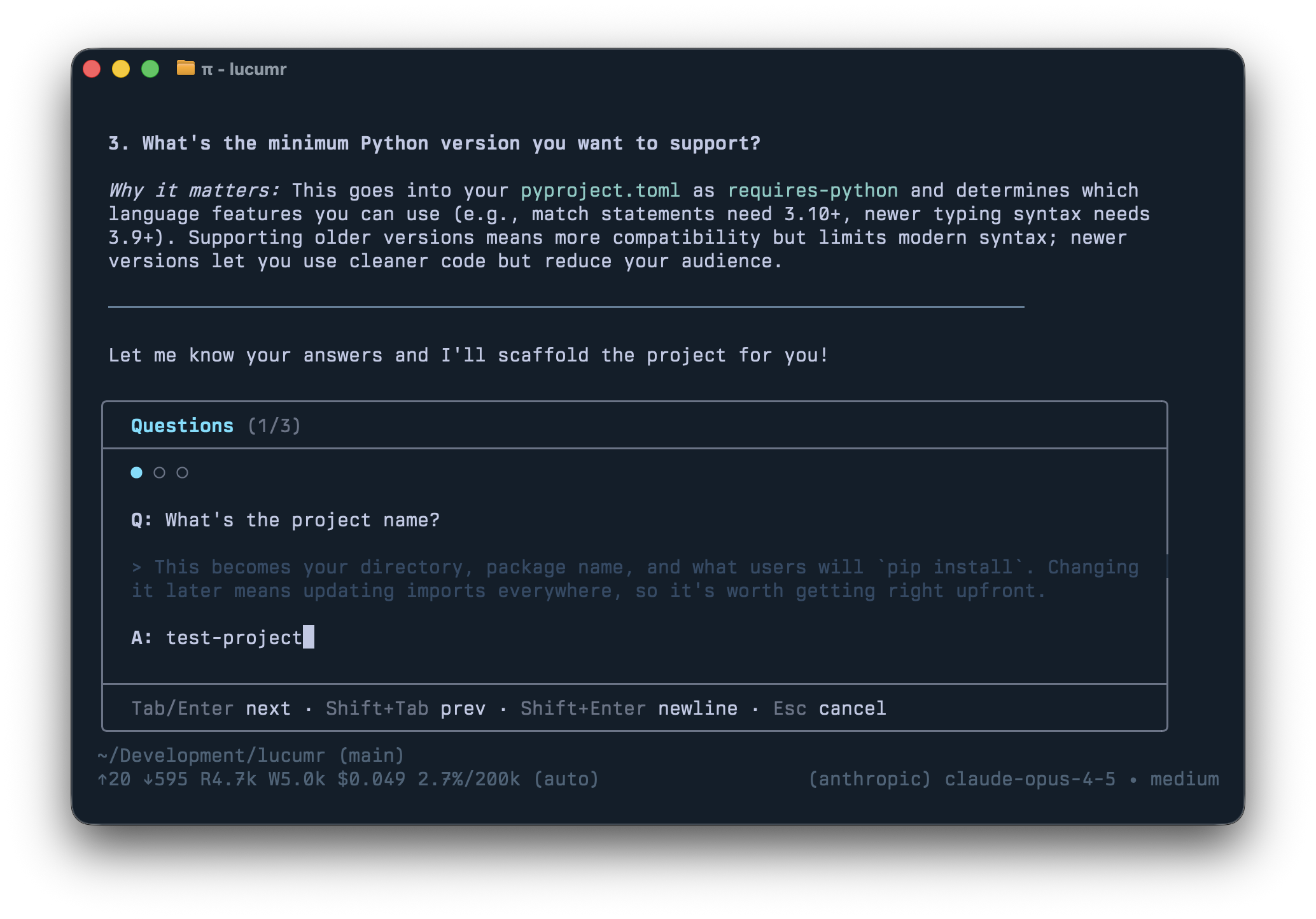
The problem: answering questions inline gets messy. So `/answer` reads the
agent's last response, extracts all the questions, and reformats them into a
nice input box.
### [`/todos`](https://github.com/mitsuhiko/agent-stuff/blob/main/pi-extensions/todos.ts)
Even though I criticize [Beads](https://github.com/steveyegge/beads) for its
implementation, giving an agent a to-do list is genuinely useful. The `/todos`
command brings up all items stored in `.pi/todos` as markdown files. Both the
agent and I can manipulate them, and sessions can claim tasks to mark them as in
progress.
### [`/review`](https://github.com/mitsuhiko/agent-stuff/blob/main/pi-extensions/review.ts)
As more code is written by agents, it makes little sense to throw unfinished
work at humans before an agent has reviewed it first. Because Pi sessions are
trees, I can branch into a fresh review context, get findings, then bring fixes
back to the main session.
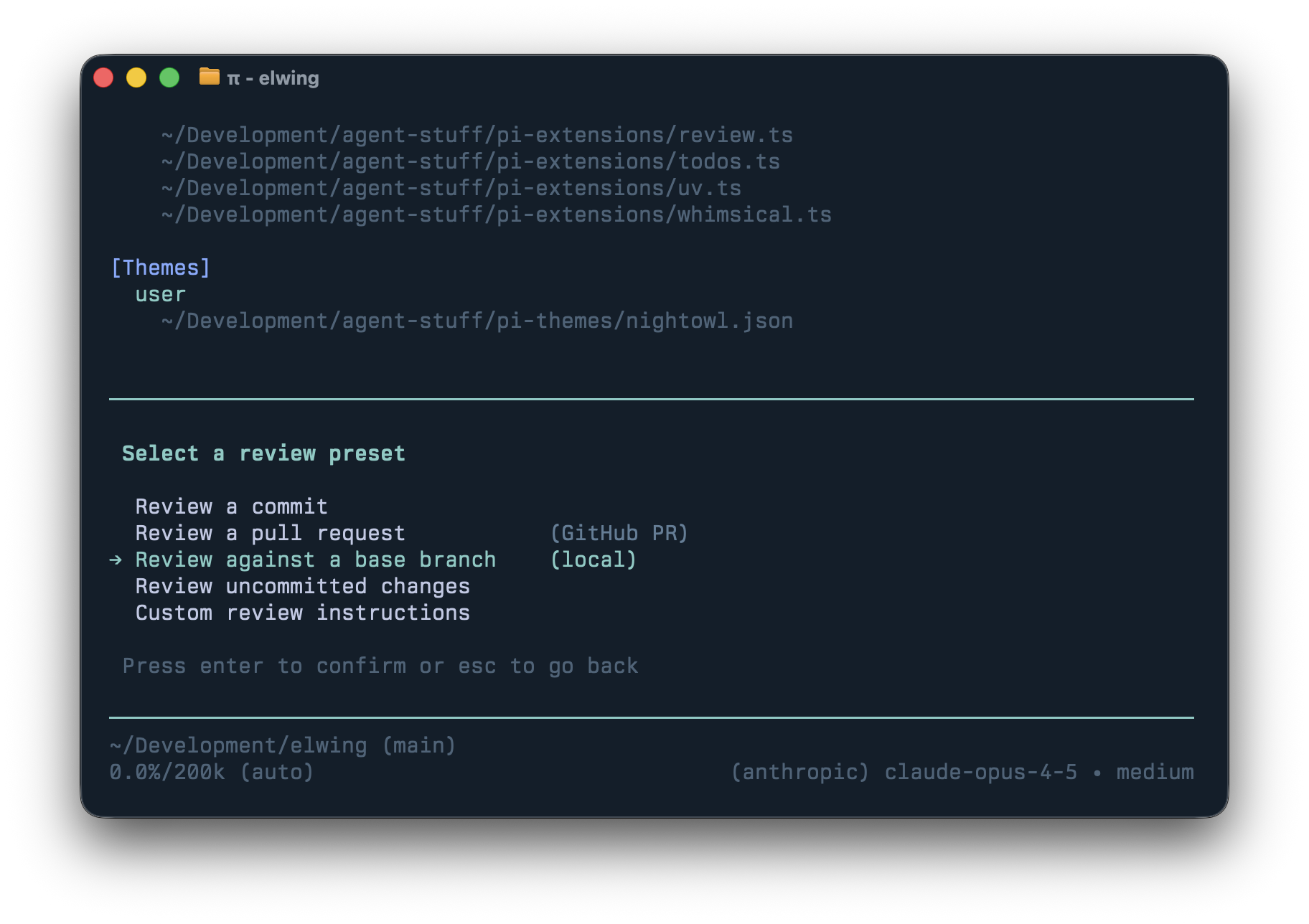
The UI is modeled after Codex which provides easy to review commits, diffs,
uncommitted changes, or remote PRs. The prompt pays attention to things I care
about so I get the call-outs I want (eg: I ask it to call out newly added
dependencies.)
### [`/control`](https://github.com/mitsuhiko/agent-stuff/blob/main/pi-extensions/control.ts)
An extension I experiment with but don't actively use. It lets one Pi agent send
prompts to another. It is a simple multi-agent system without complex
orchestration which is useful for experimentation.
### [`/files`](https://github.com/mitsuhiko/agent-stuff/blob/main/pi-extensions/files.ts)
Lists all files changed or referenced in the session. You can reveal them in
Finder, diff in VS Code, quick-look them, or reference them in your prompt.
`shift+ctrl+r` quick-looks the most recently mentioned file which is handy when
the agent produces a PDF.
Others have built extensions too: [Nico's subagent
extension](https://github.com/nicobailon/pi-subagents) and
[interactive-shell](https://www.npmjs.com/package/pi-interactive-shell) which
lets Pi autonomously run interactive CLIs in an observable TUI overlay.
## Software Building Software
These are all just ideas of what you can do with your agent. The point of it
mostly is that none of this was written by me, it was created by the agent to my
specifications. I told Pi to make an extension and it did. There is no MCP, there are
no community skills, nothing. Don't get me wrong, I use tons of skills. But
they are hand-crafted by my clanker and not downloaded from anywhere. For
instance I fully replaced all my CLIs or MCPs for browser automation with a
[skill that just uses
CDP](https://github.com/mitsuhiko/agent-stuff/blob/main/skills/web-browser/SKILL.md).
Not because the alternatives don't work, or are bad, but because this is just
easy and natural. The agent maintains its own functionality.
My agent has [quite a few
skills](https://github.com/mitsuhiko/agent-stuff/tree/main/skills) and crucially
I throw skills away if I don't need them. I for instance gave it a skill to
read Pi sessions that other engineers shared, which helps with code review. Or
I have a skill to help the agent craft the commit messages and commit behavior I
want, and how to update changelogs. These were originally slash commands, but
I'm currently migrating them to skills to see if this works equally well. I
also have a skill that hopefully helps Pi use `uv` rather than `pip`, but I also
added a custom extension to intercept calls to `pip` and `python` to redirect
them to `uv` instead.
Part of the fascination that working with a minimal agent like Pi gave me is
that it makes you live that idea of using software that builds more software.
That taken to the extreme is when you remove the UI and output and connect it
to your chat. That's what OpenClaw does and given its tremendous growth,
I really feel more and more that this is going to become our future in one
way or another.
[^1]: https://x.com/steipete/status/2017313990548865292
 ### [`/todos`](https://github.com/mitsuhiko/agent-stuff/blob/main/pi-extensions/todos.ts)
Even though I criticize [Beads](https://github.com/steveyegge/beads) for its
implementation, giving an agent a to-do list is genuinely useful. The `/todos`
command brings up all items stored in `.pi/todos` as markdown files. Both the
agent and I can manipulate them, and sessions can claim tasks to mark them as in
progress.
### [`/review`](https://github.com/mitsuhiko/agent-stuff/blob/main/pi-extensions/review.ts)
As more code is written by agents, it makes little sense to throw unfinished
work at humans before an agent has reviewed it first. Because Pi sessions are
trees, I can branch into a fresh review context, get findings, then bring fixes
back to the main session.
### [`/todos`](https://github.com/mitsuhiko/agent-stuff/blob/main/pi-extensions/todos.ts)
Even though I criticize [Beads](https://github.com/steveyegge/beads) for its
implementation, giving an agent a to-do list is genuinely useful. The `/todos`
command brings up all items stored in `.pi/todos` as markdown files. Both the
agent and I can manipulate them, and sessions can claim tasks to mark them as in
progress.
### [`/review`](https://github.com/mitsuhiko/agent-stuff/blob/main/pi-extensions/review.ts)
As more code is written by agents, it makes little sense to throw unfinished
work at humans before an agent has reviewed it first. Because Pi sessions are
trees, I can branch into a fresh review context, get findings, then bring fixes
back to the main session.
 The UI is modeled after Codex which provides easy to review commits, diffs,
uncommitted changes, or remote PRs. The prompt pays attention to things I care
about so I get the call-outs I want (eg: I ask it to call out newly added
dependencies.)
### [`/control`](https://github.com/mitsuhiko/agent-stuff/blob/main/pi-extensions/control.ts)
An extension I experiment with but don't actively use. It lets one Pi agent send
prompts to another. It is a simple multi-agent system without complex
orchestration which is useful for experimentation.
### [`/files`](https://github.com/mitsuhiko/agent-stuff/blob/main/pi-extensions/files.ts)
Lists all files changed or referenced in the session. You can reveal them in
Finder, diff in VS Code, quick-look them, or reference them in your prompt.
`shift+ctrl+r` quick-looks the most recently mentioned file which is handy when
the agent produces a PDF.
Others have built extensions too: [Nico's subagent
extension](https://github.com/nicobailon/pi-subagents) and
[interactive-shell](https://www.npmjs.com/package/pi-interactive-shell) which
lets Pi autonomously run interactive CLIs in an observable TUI overlay.
## Software Building Software
These are all just ideas of what you can do with your agent. The point of it
mostly is that none of this was written by me, it was created by the agent to my
specifications. I told Pi to make an extension and it did. There is no MCP, there are
no community skills, nothing. Don't get me wrong, I use tons of skills. But
they are hand-crafted by my clanker and not downloaded from anywhere. For
instance I fully replaced all my CLIs or MCPs for browser automation with a
[skill that just uses
CDP](https://github.com/mitsuhiko/agent-stuff/blob/main/skills/web-browser/SKILL.md).
Not because the alternatives don't work, or are bad, but because this is just
easy and natural. The agent maintains its own functionality.
My agent has [quite a few
skills](https://github.com/mitsuhiko/agent-stuff/tree/main/skills) and crucially
I throw skills away if I don't need them. I for instance gave it a skill to
read Pi sessions that other engineers shared, which helps with code review. Or
I have a skill to help the agent craft the commit messages and commit behavior I
want, and how to update changelogs. These were originally slash commands, but
I'm currently migrating them to skills to see if this works equally well. I
also have a skill that hopefully helps Pi use `uv` rather than `pip`, but I also
added a custom extension to intercept calls to `pip` and `python` to redirect
them to `uv` instead.
Part of the fascination that working with a minimal agent like Pi gave me is
that it makes you live that idea of using software that builds more software.
That taken to the extreme is when you remove the UI and output and connect it
to your chat. That's what OpenClaw does and given its tremendous growth,
I really feel more and more that this is going to become our future in one
way or another.
[^1]: https://x.com/steipete/status/2017313990548865292
The UI is modeled after Codex which provides easy to review commits, diffs,
uncommitted changes, or remote PRs. The prompt pays attention to things I care
about so I get the call-outs I want (eg: I ask it to call out newly added
dependencies.)
### [`/control`](https://github.com/mitsuhiko/agent-stuff/blob/main/pi-extensions/control.ts)
An extension I experiment with but don't actively use. It lets one Pi agent send
prompts to another. It is a simple multi-agent system without complex
orchestration which is useful for experimentation.
### [`/files`](https://github.com/mitsuhiko/agent-stuff/blob/main/pi-extensions/files.ts)
Lists all files changed or referenced in the session. You can reveal them in
Finder, diff in VS Code, quick-look them, or reference them in your prompt.
`shift+ctrl+r` quick-looks the most recently mentioned file which is handy when
the agent produces a PDF.
Others have built extensions too: [Nico's subagent
extension](https://github.com/nicobailon/pi-subagents) and
[interactive-shell](https://www.npmjs.com/package/pi-interactive-shell) which
lets Pi autonomously run interactive CLIs in an observable TUI overlay.
## Software Building Software
These are all just ideas of what you can do with your agent. The point of it
mostly is that none of this was written by me, it was created by the agent to my
specifications. I told Pi to make an extension and it did. There is no MCP, there are
no community skills, nothing. Don't get me wrong, I use tons of skills. But
they are hand-crafted by my clanker and not downloaded from anywhere. For
instance I fully replaced all my CLIs or MCPs for browser automation with a
[skill that just uses
CDP](https://github.com/mitsuhiko/agent-stuff/blob/main/skills/web-browser/SKILL.md).
Not because the alternatives don't work, or are bad, but because this is just
easy and natural. The agent maintains its own functionality.
My agent has [quite a few
skills](https://github.com/mitsuhiko/agent-stuff/tree/main/skills) and crucially
I throw skills away if I don't need them. I for instance gave it a skill to
read Pi sessions that other engineers shared, which helps with code review. Or
I have a skill to help the agent craft the commit messages and commit behavior I
want, and how to update changelogs. These were originally slash commands, but
I'm currently migrating them to skills to see if this works equally well. I
also have a skill that hopefully helps Pi use `uv` rather than `pip`, but I also
added a custom extension to intercept calls to `pip` and `python` to redirect
them to `uv` instead.
Part of the fascination that working with a minimal agent like Pi gave me is
that it makes you live that idea of using software that builds more software.
That taken to the extreme is when you remove the UI and output and connect it
to your chat. That's what OpenClaw does and given its tremendous growth,
I really feel more and more that this is going to become our future in one
way or another.
[^1]: https://x.com/steipete/status/2017313990548865292